If you want to use the same license on a new PC, follow these steps,
- On the previous PC, sign in with the same account that holds the license.
- Open Tools > Account Management, then go to the License & Subscription tab.
- Locate the license you intend to use on the new PC and verify that it’s currently activated on the old device.
- Select that license in the list, then click “Deactivate License on this PC” to free it up.
- After deactivation, you’ll see the word “free” under the “Activate PC” column for that license.
- On the new PC, sign in with the same account.
- Go again to Tools > Account Management > License & Subscription, select the free license, and click “Activate License on this PC”.
- The license is now active on your new PC and ready to use.
Tips & reminders
- Make sure you deactivate the license on the old PC before attempting activation on the new one — activation won’t work if the license is still tied to another machine.
- Both PCs must use the same account (i.e., the one that originally activated the license).
- If you run into any issues (e.g., the “free” status doesn’t appear or activation fails), contact support and provide your account info and license ID for faster assistance.
许可证自动续期。您可以在许可证表中 "有效期至 "下的 "许可证和订阅 "选项卡中查看许可证的续期日期。
如果您使用 Stripe 购买许可证,您可以使用 Stripe 客户门户查看下一个付款周期的数据和续订详情。更多信息,请点击" "。如何使用 Stripe 购买许可证"指南。
许可证总是有到期日期的,在 "账户管理 "窗口的 "许可证和订阅 "选项卡中可以看到。如果许可证已过期,则必须更新许可证。
如果您的许可证是通过 Stripe 购买的,您可以按照" "中的 "如何使用 Stripe 续订已取消的 ContourTrace 许可证 "续订许可证。如何使用 Stripe 购买许可证"指南。
如果不填写 订阅表格 或 联系我们页面并通过电子邮件要求更新许可证详细信息。否则,软件将无法继续使用。
使用我们的应用程序,试用许可证可在几秒钟内全自动发放。所有其他许可证均在两个工作日内发放。
请记住,跟踪许可证只在计算机中生成一次,可由最初创建许可证的用户账户访问
如果您在获取路径许可证时遇到困难,请务必联系我们或发送电子邮件至我们的电子邮箱 info@contourtrace.com
目前,我们只提供单用户直销许可证。我们很乐意为贵公司或组织提供个人多用户许可证套餐。请通过以下方式联系我们 info@contourtrace.com.
查找许可证的最简单方法是通过 ContourTrace 中集成的 "账户管理"。您可以在应用程序开始时访问该窗口,或者如果您已经打开了 ContourTrace,则可以通过以下选项卡找到它 工具-> 账户管理 -> 许可证和订购.
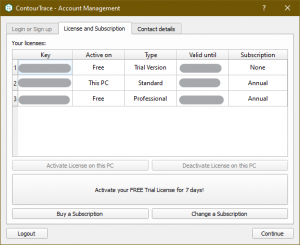
如果无法创建试用许可证,则意味着您的用户账户或其他账户已经为该电脑创建了试用许可证、
请 联系我们 如果您对许可证的创建有任何疑问,请联系我们。
是的,您可以使用一个许可证在多台计算机上工作,但不能同时工作,因为许可证与用户详细信息相关联,同一用户必须停用一台计算机上使用的许可证,才能在另一台计算机上使用/激活它。请记住,停用许可证只能由同一用户和最初用于激活许可证的计算机完成。
更多信息 联系我们 或致函我们的电子邮件地址 info@contourtrace.com
我们很高兴为您提供为期 7 天的免费试用版,以降低引入 ContourTrace 的门槛。在试用期内,迈出第一步并让自己相信 ContourTrace 所提供的众多可能性。登录我们的应用程序,点击" "中的 "激活您的 7 天免费试用许可证!",即可轻松获得试用许可证。许可证和订阅"选项卡的"账户管理"窗口。
订购 ContourTrace 的费用取决于所选的许可证包。当前价格可在 定价.
ContourTrace 提供标准、专业和高级软件包。对于软件入门和简单应用,我们推荐使用商业用途的 "标准 "软件包。您可以使用 "专业 "和 "高级 "商业软件包的全部功能。这些功能包括轮廓修改的扩展功能、创建和导出节省数据的样条以及相机校准等附加服务。
关于各个软件包功能范围的详细区分,请参见 定价.
如果您对许可证有任何疑问,我们将很乐意为您提供建议。我们为每位客户提供合适的套餐 联系我们!
登录我们的应用程序后,您可以轻松创建一个为期 7 天的试用许可证,甚至可以通过点击应用程序中 "许可证和订阅 "选项卡上的 "购买订阅 "操作来获得更多订阅选择。要获得试用许可证或普通许可证,请选中 安装 page.
如果您的公司或组织需要更多许可证,我们很乐意为您提供单独报价。请通过以下方式联系我们 info@contourtrace.com
 Chinese
  English
  Bulgarian
  Czech
Czech  Danish
  Dutch
Dutch  Estonian
  Finnish
  French
  German
  Greek
Greek  Hungarian
  Indonesian
  Italian
  Japanese
  Lithuanian
  Latvian
  Polish
  Portuguese
  Romanian
  Russian
  Slovak
  Slovenian
  Spanish
  Swedish
  Turkish
  Ukrainian